|
| |||
|
| |||
|
| |||
|
| |||
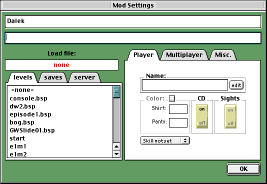
To edit the settings for a mod, double-click its name in the list. A panel with controls for the mod's settings will open that looks like this:
There are 3 main areas on this panel:
|
|
At the top are two long windows. The top window is the name of this particular mod or setting, you can edit this name to change the way it appears in the list of mods and settings. The window beneath represents part of the command line that will be sent to Quake when it is launched. Using the other controls on the panel changes the command line, and you can also use this window to edit it directly.
|
|
|
|
Below and to the left is a tabbed panel marked levels, saves and server. The levels are a list of levels or maps available to that mod, including all the original Quake levels. The saves are a list of saved games available. Double-clicking an item on either list will set Quake to load that level or saved game when it is launched. The server panel has two boxes. If you enter a Quake or Quakeworld server's IP address (a number like 123.45.67.89) or domain name (like quake.ourserver.com) it will set Quake or Quakeworld to connect to that server when it is launched. Note that you may also have to set the port number to something other than 27000 if the server uses a different port for Quake games.
|
|
|
|
To the right is a tabbed panel marked Player, Multiplayer, and Misc. These panels contain controls to alter many of Quakes settings... |
|
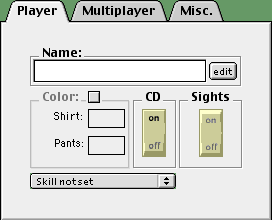
You can type a name for yourself in the Name panel, which adds +name "x" to the command line. Clearing the window removes the command. The edit button calls up the advanced name editor.
Clicking the Color check box adds the +color "x y" command. Your shirt and pants colour can be chosen with the two pop-up menus.
The CD rocker-switch enables and disables the CD. Clicking the switch to "off" adds the -nocdaudio command to the command line. Disabling the CD can make Quake run faster as it no longer has to pipe data from the CD to your speakers.
The Sights rocker switch enables and disables cross-hair sights, which aid aiming. Clicking the switch to "on" adds the command +crosshair "1", switching it to "off" changes this to +crosshair "0", clicking the switch to its middle position removes the +crosshair command.
The pop-up menu marked Skill not set can be used to choose between "easy", "normal", "hard" and "nightmare" skill settings. Setting a skill level adds the +skill "x" command to the command line.
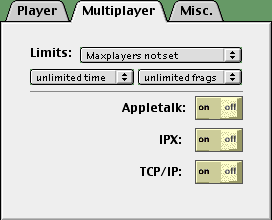
The pop-up menu marked Maxplayers not set can be used to set the number of players for multiplayer games or games versus 'bots'. Setting a maximum number of players adds +maxplayers "x" to the command line.
Similarly the pop-up menu marked unlimited time can be used to set a time limit for levels played as multiplayer games, and the pop-up menu marked unlimited frags can be used to limit the number of kills or 'frags' before the game moves to the next map. Using these menus adds the +timelimit "x" and/or +fraglimit "x" commands.
The three rocker switches - Appletalk, IPX, and TCP/IP - turn communication options on and off for multiplayer network play. If you are playing a solo game, it's more efficient to switch these to "off". Switching them to "off" adds the -noatalk, -noipx, and -notcpip commands respectively.
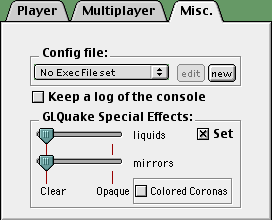
The Config
file: group contains three
controls:
The pop-up menu marked No Exec File
set can be used to choose a file