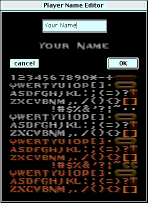
The advanced name editor can be used to change your name (in Quake!) using the special graphical characters. A preview of the name as it might appear in Quake appears below the editing window.
To use the special characters, position the cursor in the top window where you wish them to appear and then click on the characters in the display below.
Certain combinations of special characters
will not appear in Quake. You will need to check if your name appears
correctly by starting a game of Quake with MacQFE, summoning the
console, and entering the command 'name'.
Most names that start with a normal (blue) letter seem to work OK,
regardless of what special characters follow in the name.