If you continue to use it you'll probably want to obtain a registered version that doesn't keep prompting you to pay up every time you use it.
The easiest way to get one is to pay the $10 registration fee by using the KAGI register program to pay by credit-card, or to send the author the money directly (green and folding! please). Then I'll e-mail or post you a registration code.
Alternatively you could look for a hacked registration code from a warez site, but I doubt if you'll find it's worth the trouble. Of course, if you want a real challenge you could try to crack the encryption code, but you'll have to be an expert cryptographer/programmer to do this, and frankly you might as well spend the time writing your own version of MacQFE!
There is one other way to get a registration code: if you find a bug or suggest a feature that will make MacQFE better and send it to me. Those reports and suggestions that make it (and my decision will be final) shall receive a free registration code.
You can contact the author, Giles Williams, at giles.gqt@otranto.demon.co.uk.
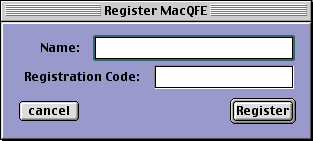
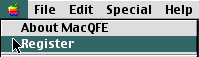
Click on the Register option of the Apple menu. The Register MacQFE window should appear. Type in your name as it appears on the confirmation of your registration and the registration code, then click the Register button.