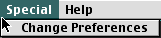
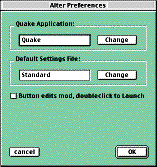
The Preferences option of the Special menu can be used to adjust MacQFE's behaviour.
To change which application MacQFE launches first choose the Preferences option of the Special menu then click on the Change button in the box labelled Quake Application. This will invoke a standard "open file" dialog to choose the Quake application (either Quake, Quake 3dfx, Quake RAVE, or some other variant).
To change which MacQFE setting file is used when MacQFE is opened first choose the Preferences option of the Special menu then click on the Change button in the box labelled Default Settings File. This will invoke a standard "open file" dialog to choose the required settings file.
You may find it more intuitive to double-click an entry in MacQFE's main window to launch it, and to press a button to edit it. If so, first choose the Preferences option of the Special menu then click the box marked Button edits mod, double-click to Launch until it is checked.